Dealing with Eclipse
Egit unable to store Password
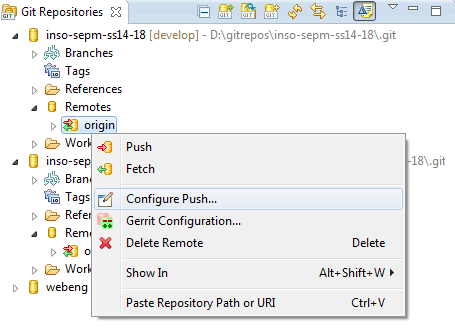
Sometimes Eclipse fails to store your EGit/SVN passwords in secure storage, so you have to enter them again and again. Workaround for this is to go into Git-View, open up your remotes, right click the one you want to save the password for and select Configure Push.
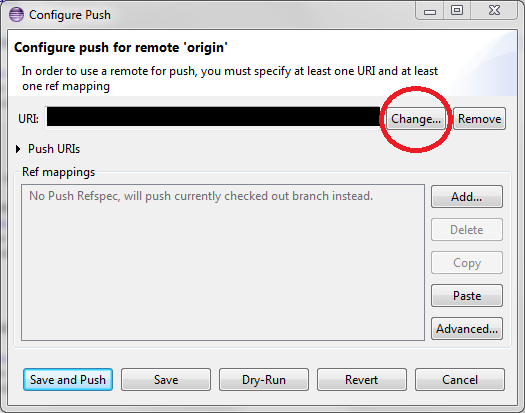
Hit Change... next to the URI.
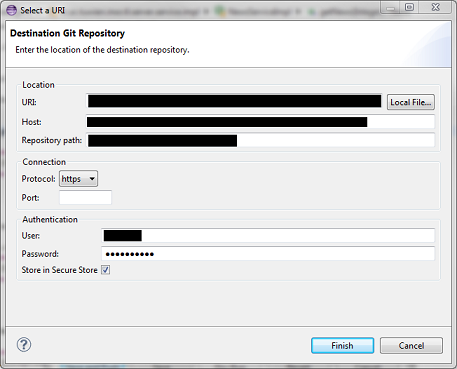
Here you can set the username and password you want to use and tick Store in Secure Storage
Now Eclipse should remember it.
Update:
You might also need to remove an associated ssh authentification from your repository via rightclick on the repository in Git-View, then select Properties, look for remote and remove the key file.
Eclipse throwing build errors/not finding Classes when using Frameworks (spring, play, …)
If you use Git and/or Frameworks Eclipse sometimes failes to rebuild/find all classes. A quick Project -> Clean... -> Clean all Projects often helps.